Using a FaxBridge
What is a FaxBridge?
A FaxBridge is exactly what its name implies—a bridge between your analog fax machine and the internet.
It allows you to send and receive faxes over a secure internet connection while continuing to use your existing fax machine and fax number. By using a FaxBridge, customers can eliminate the need for an analog phone line, resulting in significant cost savings without changing how they fax.
All FaxBridge communication uses HTTPS, a secure internet protocol that ensures documents are transmitted safely, reliably, and in a regulation‑compliant manner.
Each FaxBridge arrives pre‑provisioned with your fax number, so setup is quick and easy. Simply plug it in and begin sending and receiving faxes.
Installing a FaxBridge
Step 1
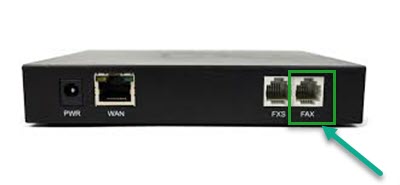
Plug the included phone cord (RJ‑11) into:
- The Line port on the back of your fax machine
- The Fax port on the FaxBridge
Installing a FaxBridge
Step 1
Plug in the included phone cord (RJ-11 cord) into the line port on the back of your fax machine and into the fax port on the FaxBridge
Step 2
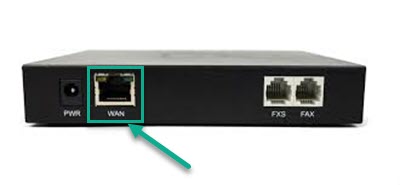
Connect an Ethernet cable from your network connection (wall jack or router) to the WAN port on the FaxBridge.
This connection allows the FaxBridge to communicate securely over the internet.
Step 3
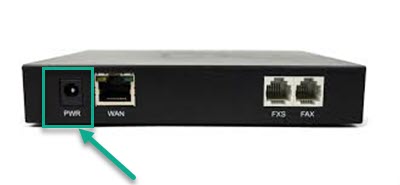
Plug the power cable into the FaxBridge and connect it to a power outlet.
⚠️ Important: Do not use the FXS port on the FaxBridge.
Once powered on, the FaxBridge will begin initializing and preparing for secure fax communication.
Note
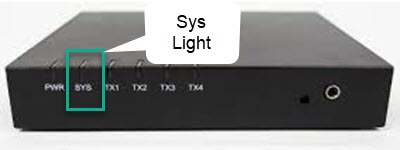
Allow a few minutes for the FaxBridge to communicate with the FaxAgent server.
Once the SYS light on the unit turns on, your fax machine has been successfully assigned an IP address and is ready to send and receive faxes securely over the internet.
Step 4
Start sending faxes!
Your FaxBridge is now fully set up and ready to securely send and receive faxes over the internet using your existing fax machine and fax number.