Profile
The Profile tab contains all of a user's relevant account set up information for sending and receiving faxes.
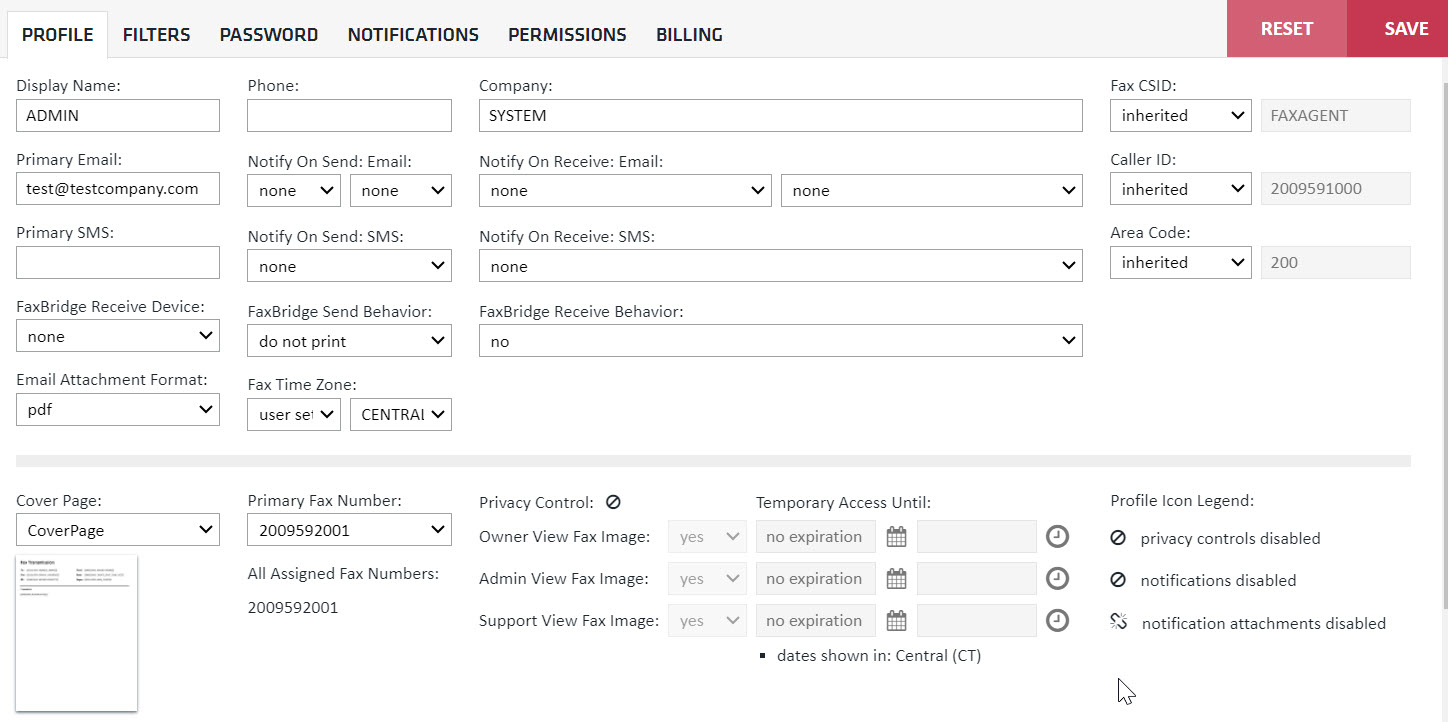
| Field | Description |
| Display Name | Your name on FaxAgent. This name will appear in several places throughout the application |
| Phone | Your phone number |
| Company | Your company |
| Fax CSID Option/Name | The caller ID option for your faxes. Either interited from admin settings, or set by the user. If set by user, you must enter a number in the next box to set the value. |
| Primary Email | Your email address you log ino the application with. It is also used for faxing and email notifications |
| Notify on Send Email/Attachment | When you send a fax, the option for when you receive an email notification (all faxes, only successful faxes, only failed faxes). The next box determines if you are copied on any fax attachments. |
| Notify on Receive Email/Attachment | When you receive a fax, the option for when you receive an email notification (all faxes, only successful faxes, only failed faxes). The next box determines if you are copied on any fax attachments. |
| Caller ID Option/Caller ID # | The caller ID number that shows when you send a fax (inherited from the Admin settings, or user set. If set by user, you must enter a number in the next box to set the value) |
| Primary SMS | The primary phone number used for your sms messages |
| Notify on Send SMS/Attachment | What sms notifications do you receive when you send a fax(none, all faxes, only successful faxes, only failed faxes) |
| Notify on Receive SMS/Attachment | What sms notifications do you receive when you receive a fax(none, all faxes, only successful faxes, only failed faxes) |
| Area Code Option Option/Area Code | Your area code (inherited from the Admin settings, or user set. If set by user, you must enter a number in the next box to set the value) |
| FaxBridge Receive Device | The FaxBridge assigned to your account |
| FaxBridge Send Behavior | Either print/do not print confirmation of faxes |
| FaxBridge Receive Behavior | Yes/No/Scheduled |
| Email Attachment Format | .pdf or tif |
| Fax Time Zone Option/Time Zone | The time zone option (inherited from the Admin or user set)/The time zone set |
| Cover Page | The default cover page FaxAgent uses for sending faxes |
| Primary Fax Number | Your fax number (and underneath that, all assigned fax numbers) |
| All Assigned Fax Numbers | Lists all assigned fax number for your account |
| Privacy Control | These options determine whether the fax owner (you), and Admin, or Support can have access to your faxes. You can say yes, then set an expiration date in the adjoining fields |