Security Zones
A Security Zone is a way to lock down access to FaxAgent to specific IP Addresses. This provides an extra level of security for FaxAgent to assure traffic only comes from places the Admin authorizes. Security Zones can be set on the System Tab, as well as here in the Admin. Security Zones apply to the tenant you created it on, as well as all sub-tenants.
These are different than Public Security Zones in the System tab, which are system-wide and specific to internal users.

Security Zone Actions
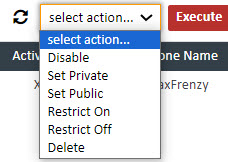
From the actions menu you can change the settings of a Security Zone without going into the Security Zone dialog.
| Settings | Description |
| Disable | Disables/deactivates the security zone |
| Set Private | Sets the visibility to private so sub-tenants cannot see it |
| Set Public | Sets the visibility to public so sub-tenants can see it |
| Restrict On | Sets the Restrict field to on |
| Restrict Off | Sets the Restrict field to off |
| Delete | Removes the security zone from the grid |
To perform an action on any Security Zone:
- Highlight the row of the security zone
- From the actions menu, choose the action you want
- CLick Execute
Creating a New Security Zone
To create a new Security Zone:
- Click the CREATE button
- Enter all of the required information
- Click SAVE - You will see the information in the grid
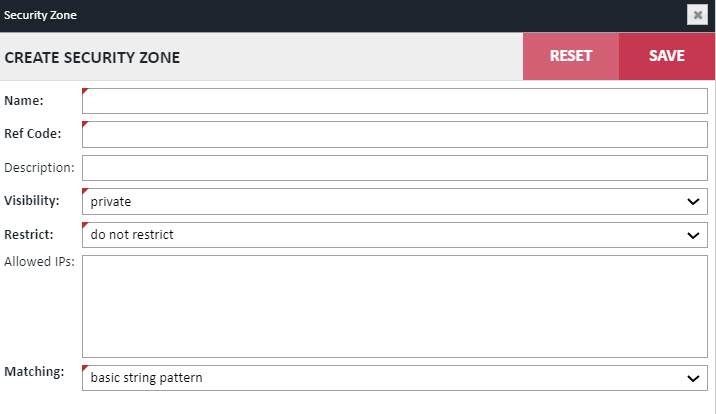
| Field | Description |
| Name | The name of your security zone |
| Ref Code | An additional reference code for your security zone |
| Description | A description for your security zone |
| Visibility | Who can see this zone (disabled, public, private) |
| Restrict | Either "restrict by IP" (in box below) or "do not restrict" |
| Allowed IPs | Your list of allowed IPs for this tenant. Either enter one IP address per line or comma separate them |
| Matching | Either "basic string pattern" (default), or "regular expression" (rarely used) |