Manage Users
The Manage Users section allows a FaxAgent Administrator to manage user information, security settings, billing details, and other user‑specific configurations to ensure the tenant operates smoothly.
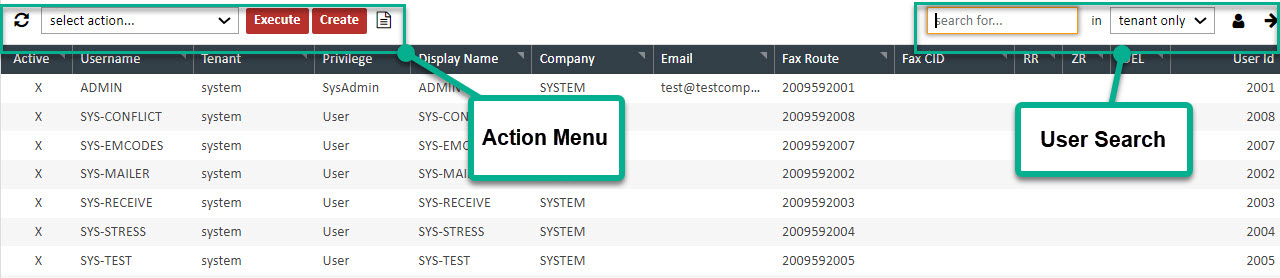
The User Grid below displays all basic user information at a glance. From this screen, Administrators can:
- Search for a specific user using the User Search feature in the upper‑right corner
- Perform actions on users using the Action menu in the upper‑left corner
This centralized view makes it easy to review, update, and maintain user configurations across the tenant.
User Actions
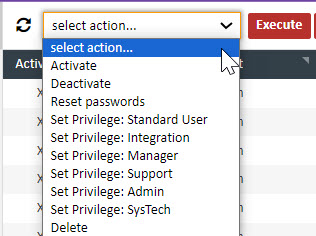
The User Actions dropdown allows Administrators to perform various actions on an individual user.
To perform an action:
- Highlight the user in the User Grid
- Select the desired action from the dropdown menu
- Click EXECUTE to apply the action
Always verify that the correct user is selected before executing an action, as some changes may affect user access or permissions.
| Action | Description |
| Activate | Activates user |
| Deactivate | Deactivates user |
| Reset Passwords | Opens password reset dialog so you can reset the password |
| Set Privilege: Standard User | Sets the privilege of the user to User |
| Set Privilege: Integration | Sets the privilege of the user to Integration |
| Set Privilege: Manager | Sets the privilege of the user to Manager |
| Set Privilege: Support | Sets the privilege of the user to Support |
| Set Privilege: Admin | Sets the privilege of the user to Admin |
| Set Privilege: SysTech | Sets the privilege of the user to SysTech |
| Delete | Deletes the user |
Creating a New User
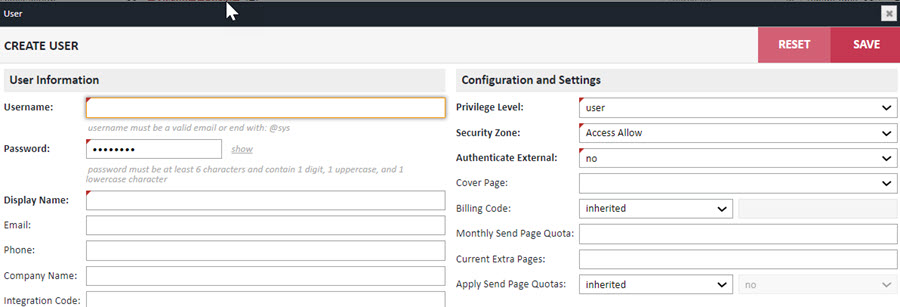
To create a new user, click the CREATE button. The Create User dialog will appear.
Complete the form with all relevant user information, then click SAVE to create the user.
Fields displayed in bold are required.
| Field | Description |
| User Information | |
| Username | The user's username they will log into the application with |
| Password | The system auto-generates a password that you can see when you click the show button. You can then change it needed. |
| Display Name | The name of the user which will be displayed in the application |
| The user's email address | |
| Phone | The user's phone number |
| Company Name | The company name of the user |
| Integration Code | Leave this blank for now |
| Configuration and Settings | |
| Privilege Level | The security/privilege level for this user |
| Security Zone | The security zone for the user, if any. See instructions on security zones in this document |
| Authenticate External | Leave this at "no" |
| Cover Page | The default cover page for the user |
| Billing Code | The user's billing code, if any |
| Monthly Send Page Quota | The user's monthly quota of outbound fax pages |
| Current Extra Pages | Any extra pages the user sent in the month |
| Apply Send Page Quota | Interhited/User Set Yes/No to actually apply the quotas, which will stop the user from sending any more faxes if they go over quota |