System Control
System Control Sections
The System Control tab contains several settings for system level functions. These settings will apply to all tenants and sub-tenants in your FaxAgent system, and is broken down into four sub-sections:
- Gateways - Specific control functions for File Gateways and Email gateways
- Workflow - These settings relate to file attachments, file rendering, and workflow queue processing
- API Control - These setings are for API system settings, including fax module, faxblast, and email to fax settings
- UI Control - System level UI control and search settings.
System Control>Gateways
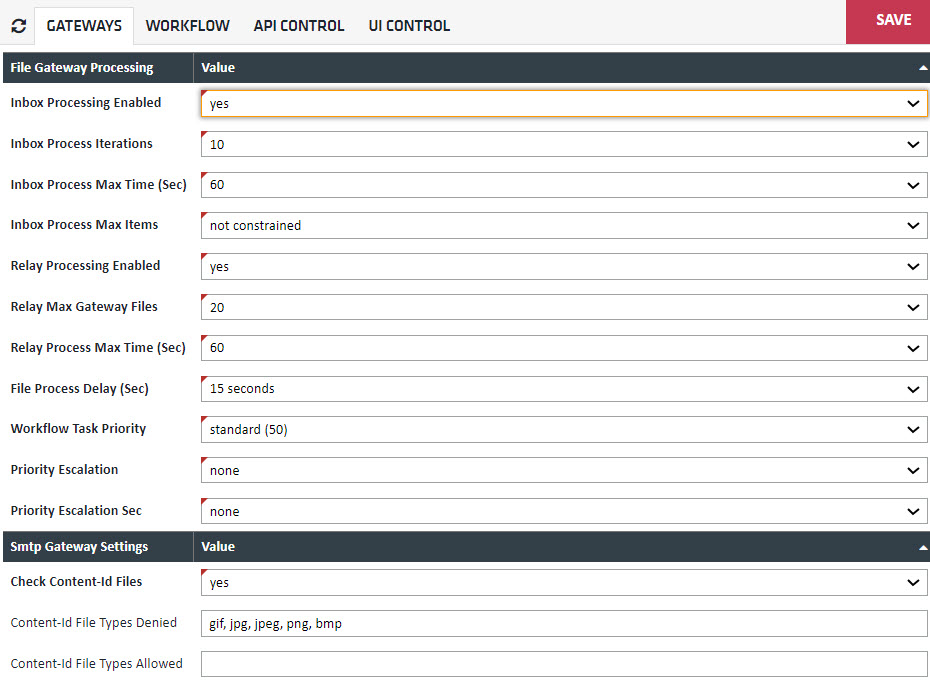
| Field | Description |
| File Gateway Processing | |
| Inbox Processing Enabled | If disabled, no gateway inbox processing will occur regardless of gateway "active" setting |
| Inbox Process Iterations | Number of times to iterate through all active gateways and process one file |
| Inbox Prrcess Time Max (sec) | Max total processing time in seconds. Once this value is reached, no more iterations are attempted. |
| Inbox Process Max Items | Max total items processed across all gateways. Once this value is reached, no more iterations will be attempted |
| Relay Processing Enabled | If disabled, no gateway relay processing will occur regardless of gateway "active" setting |
| Max Relay Gateway Files | Maximum number of files to move to the gateway inbox per processing attempt |
| Relay Process Max Time (sec) | Maximum total processing time allowed, in seconds. Once this value is reached, no more iterations will be attempted. |
| File Process Delay | Delay in seconds from the last modify timestamp of a file until the file is available for processing |
| Workflow Task Priority | Priority of tasks for each file created through the gateway. A lower number is a higher priority. |
| Priority Escalation | Amount to reduce the priority value per escalation time. Priority escalation ensures that older files in the workflow with a lower priority eventually move to a higher priority |
| Priority Escalation Sec | How often, in seconds, that the priority should be escalated (value reduced) |
| SMTP Gateway Settings | |
| Check Content-ID Files | Check all file types and allow/deny files based on those settings (see below) |
| Content-ID File Types Denied | Specific file types denied for email gateways |
| Content-ID File Types Allowed | Specific file types allowedfor email gateways |
System Control>Workflow Settings
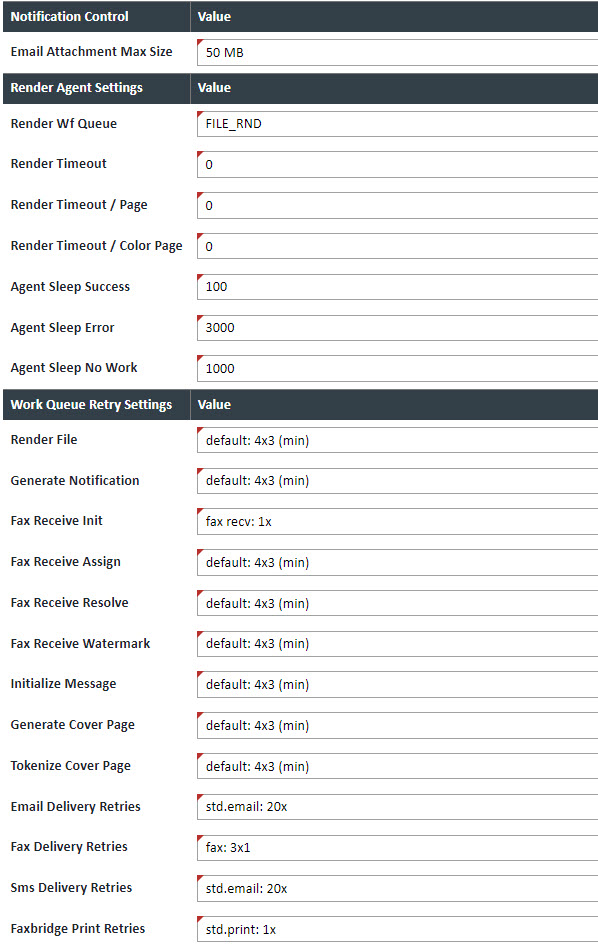
| Field | Description |
| Notification Control | |
| Email Attachment Size Max | Maximum size of attachment to allow on email forwards |
| Render Agent Settings | |
| Render WF Queue | The process to use for rendering files. Do not change this setting |
| Render Timeout | Timeout for rendering files |
| Render Timeout / Page | Timeout per black and white page for rendering files |
| Render Timeout / Color Page | Timeout per color page for rendering files |
| Agent Sleep Success | Time, in ms, when the render agent sleeps after rendering a file |
| Agent Sleep Error | Time, in ms, for an error to occur if the render agent sleep does not engage |
| Agent Sleep No Work | Time, in ms, for the render agent to go to sleep if there is no files to process |
| Work Queue Retry Settings | |
| Render File | Retry schedule for render file queue |
| Generate Notification | Retry schedule for nitidication generate queue |
| Fax Receive Init | Retry schedule for fax receive init queue |
| Fax Receive Assign | Retry schedule for fax receive assign queue |
| Fax Receive Resolve | Retry schedule for fax receive resolve queue |
| Fax Receive Watermark | Retry schedule for fax receive watermark queue |
| Initialize message | Retry schedule for message init queue |
| Generate Cover Page | Retry schedule for cover page render queue |
| Tokenize Cover Page | Retry schedule for cover page tokenize queue |
| Email Delivery Retries | Retry schedule for email delivery retries |
| Fax Delivery Retries | Retry schedule for fax delivery retries |
| SMS Delivery Retries | Retry schedule for SMS delivery retries |
| Faxbridge Print Retries | Retry schedule for faxbridge printing |
System Control>API Control
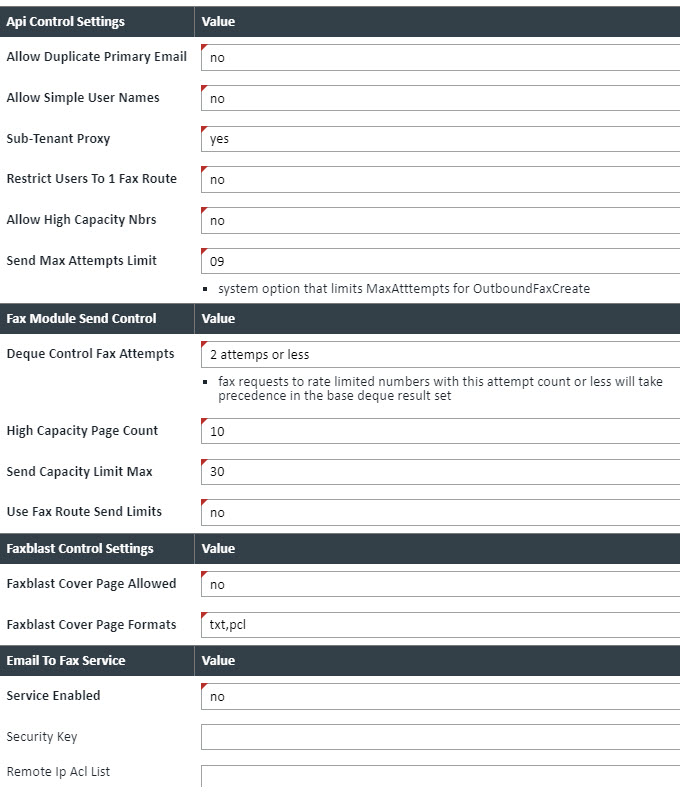
| Field | Description |
| API Control Settings | |
| Allow Duplicate Primary Email | Yes/No - Allow multiple accounts with same primary email |
| Allowe Simple User Names | Yes/No - Allow names that do not have to have a @"tenant code" after it. |
| Sub-Tenant Proxy | Yes/No - allow sub-tenant proxy |
| Restrict Users to 1 Fax Route | Yes/No - restrict users to one fax route number |
| Allow High Capacity Numbers | Yes/No - allow high capacity numbers |
| Send Max Attempts Limit | System option that limits MaxAttempts for OutboundFaxCreate API function |
| Fax Module Send Control | |
| Dequeue Control Fax Attempts | Fax requests to rate-limited numbers with this attempt count or less will take precedence in the base dequeue result set |
| High Capacity Page Count | Fax page count to treat as high capacity |
| Send Capacity Limit Max | Absolute max concurrent sending to any number |
| Use Fax Route Send Limits | Use max capacity defined in fax route send limits (System Tab>Fax Send Limits) |
| Fax Control Settings | |
| Faxblast Cover Page Allowed | Yes/No - Is a cover page allowed for fax blasts |
| Faxblast Cover Page Formats | Allowed file formats for faxblast cover pages |
| Email to Fax Service | |
| Service Enabled | Yes/No - Is the Email to Fax service enabled |
| Security Key | Security Key for Email to Fax service |
| Remote IP ACL List | IP Access list for Email to Fax service |
System Control>UI Control
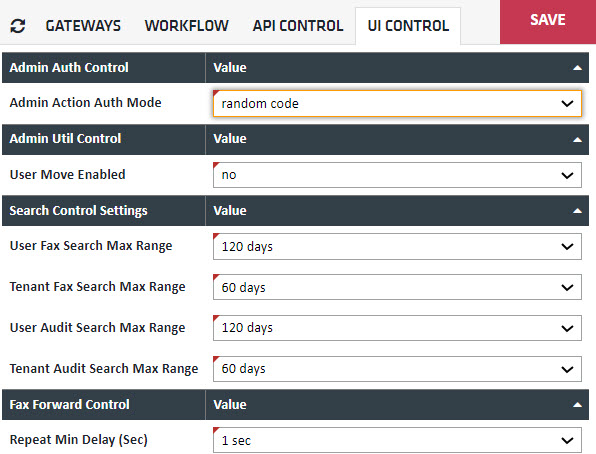
| Field | Description |
| Admin Auth Control | |
| Admin Action Auth Mode | When performing an Admin action, what method of confirmation is used |
| Admin UI Control | |
| User Move Enabled | If yes, a new System Tab option called "User Move" is enabled, allowing Admins to move users between tenants |
| Search Control Settings | |
| User Fax Search Max Range | Maximum number of days used for User Fax Search |
| Tenant Fax Search Max Range | Maximum number of days used for Tenant Fax Search |
| User Audit Serch Max Range | Maximum number of days used for Audit Tab User Search |
| Tenant Audit Search Max Range | Maximum number of days used for Audit Tab Tenant Search |
| Fax Forward Control | |
| Repeat Min Delay (Sec) | Minimum delay betwee repeated fax forward submissions |