Logon
This screen controls the default settings for the login page, as well as the security zone defaults applied during user authentication.
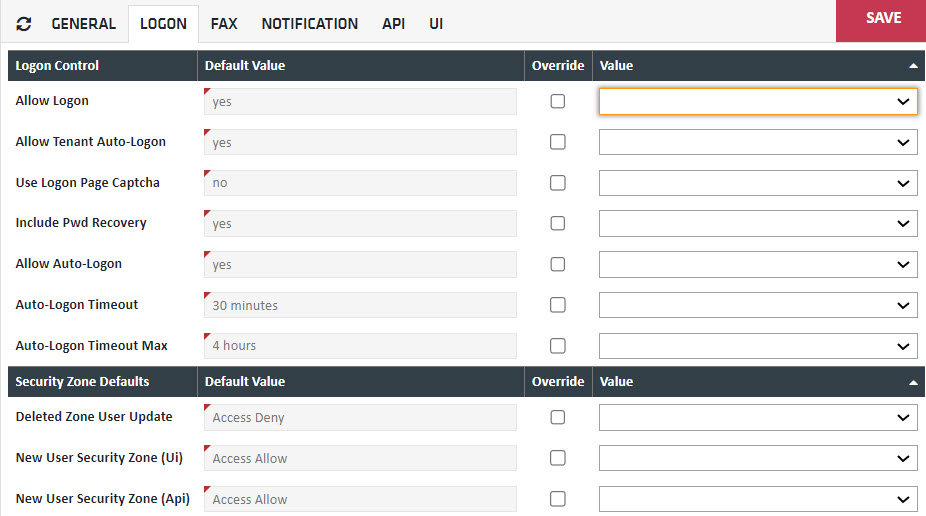
| Field | Value |
| Logon Control | |
| Allow Logon | Yes/No - Users see the "Log Me On Automatically" checkbox on the logon screen |
| Allow Tenant Auto-Logon | Yes/No - Users see the "Log Me On Automatically" checkbox on the logon screen |
| Use Logon Page Captcha | Yes/No - Users see the Captcha math problem on the logon screen |
| Include Password Recovery | Yes/No - Users see the "Password Recovery" link to recover |
| Allow Auto-logon | Yes/No - Users see the "Log Me On Automatically" checkbox on the logon screen |
| Auto-Logon Timeout | Time before auto-logon credentials will expire |
| Auto-Logon Timeout Max | The max time for auto-logon timeout |
| Security Zone Details | |
| Deleted Zone User Update | Zone to apply to users when security zone is deleted |
| New User Security Zone (UI) | Default security zone for users added via the UI |
| New User Security Zone (API) | Default security zone for users added via the API |