Logging Into FaxAgent
Logging In to FaxAgent
- Open your preferred web browser.
- In the browser’s address bar, type the FaxAgent URL provided by your system administrator.
- Press ENTER on your keyboard.
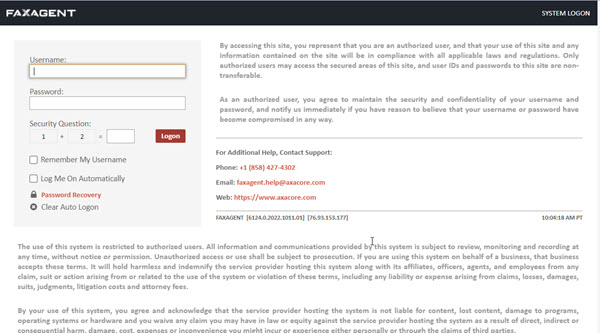
The FaxAgent Login screen will appear, prompting you to enter your credentials.
Logging In
- Enter your Username and Password.
- Answer your security question.
- Click Log On to access FaxAgent.
Login Options
-
Remember My Username
Select this option to have FaxAgent remember your username the next time you log in. -
Log Me On Automatically
Select this option to have FaxAgent remember your username and password and automatically log you in during future visits.
Password Recovery
If you forget your password, click Password Recovery and follow the on‑screen instructions to reset your password.
Clear Auto Logon
Click Clear Auto Logon to remove your saved login information. The next time you log in, you will be prompted to enter your username and password again.
SSO API Login (optional)
If your organization would like to utilize the User Interface Service API (Single Sign‑On (SSO)–style) functionality, you can use the API guide which enables third-party (Integrated) Applications to launch FaxAgent web user interfaces.
Complete API documentation, including request parameters, authentication requirements, and examples, is available here: