FaxBridge Devices
FaxBridge Devices Grid

A FaxBridge is just that, a bridge. It connects your analog fax machine to the internet, then sends and receives faxes using a secure connection. The FaxBridge Devices section is where System Admins can add, remove, and manage faxbridge devices for their tenants and sub-tenants.
FaxBridge Device Actions
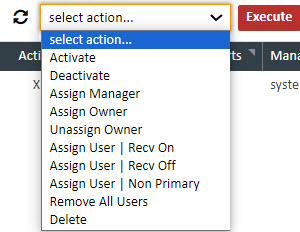
For existing faxbridge devices on the grid there are several actions you can perform to effectively manage them.
| Action | Description |
| Activate | Activates the FaxBridge for use in FaxAgent |
| Deactivate | Deactivates the FaxBridge in FaxAgent |
| Assign Manager | Assigns the tenant managing the FaxBridge, who can then assigns ownership |
| Assign Owner | The tenant assigned to this FaxBridge (assigned by the SysAdmin or Manager) |
| Unassign Owner | Removes ownership of a FaxBridge |
| Assign User | Recv On | Assigns the user and turns on the FaxBridge device for faxing |
| Assign User | Recv Off | Assigns the user but turns off the FaxBridge device for faxing |
| Assign User | Non Primary | Assigns the user and turns on the FaxBridge for faxing |
| Remove All Users | Removes all users for the device |
| Delete | Delete the FaxBridge from the system |
To perform an action:
- Highlight the row in question
- From the actions menu, choose the desired option (see below for how to search for the device)
- Click Execute
Using the Search Function in the Actions Menu
For several options in the actions menu, you will have to search for your option before you click Execute. To perform this search:
- Highlight the FaxBridge device you want to perform the action on. You may need to use the search function at the upper right of the screen
- Once you've found and highlighted the FaxBridge you want you want, choose one of these options from the actions menu. The following search screen will appear. Click FIND. If you already see the name of the user you're looking for, skip to step 4.

- In the search dialog that appears, enter the name of the tenant and click FIND
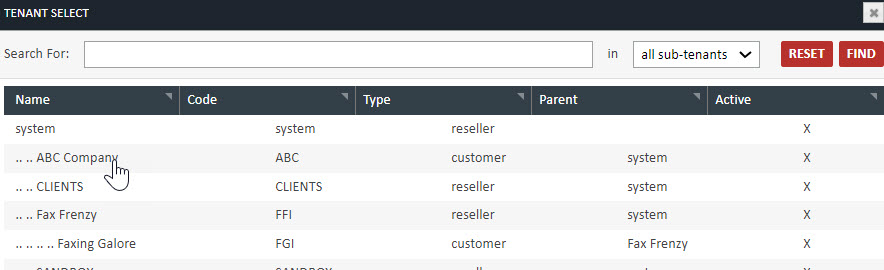
- In the search results, double-click the row of the tenant you want. The name will appear in the field next to your option


- Click Execute
Creating a Faxbridge Device
- Click on the Create button at the top of the grid. The following dialog will appear:
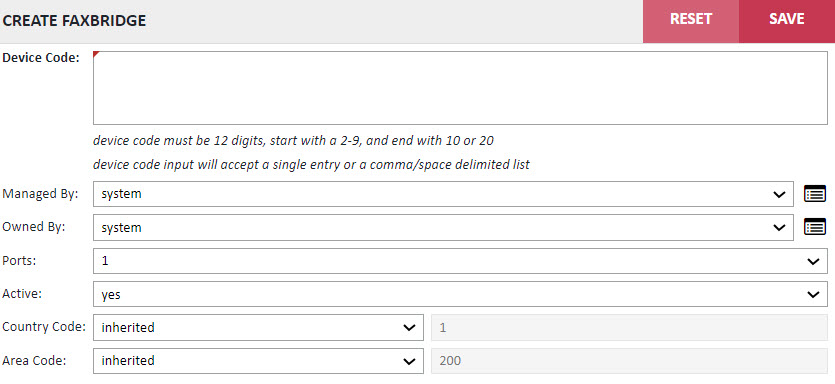
- Fill out the following fields
Field Description Device Code You should see the device code on the FaxBridge label. Enter it here Managed By The parent tenant who will be managing this device Owned By The tenant using this device (parent tenant or sub-tenant) Ports Leave as 1 Active Yes/No is this device being actively used for faxing Country Code "Inherited" - comes from the parent tenant. You can also change this to "user set" then choose your own setting. Check with your parent tenant admin before you set it yourself Area Code "Inherited" - comes from the parent tenant. You can also change this to "user set" then choose your own setting. Check with your parent tenant admin before you set it yourself - Click SAVE
- After you create your device and it is registered, you will see the following when you open the setting in the grid, but with all of the information filled in.
