Fax Send Limits
Fax Send Limits Grid

Fax Send Limits limit the number of simultaneous faxes being sent at one time, or block the number the number from sending out faxes altogether. These limits are controlled from System Tab>System Control>Fax Module Send Control>Use Fax Route Send Limits. That setting needs to be set to "yes" in order to use this functionality.
Fax Send Limit Actions
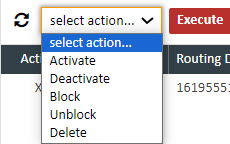
The following actions are available for items on the Fax Send Limits grid:
| Action | Description |
| Activate | Activates the send limit row for use |
| Deactivate | Deactivates the send limit row from use |
| Block | Blocks the number from sending faxes |
| Unblock | Unblocks the number from sending faxes |
| Delete | Deletes the row |
To perform any action:
- Highlight the row for the number (fax route) you want
- Choose the action from the actions menu
- Click Execute
Creating a New Fax Send Limit
- Cllick the Create button at the top of the Fax Send Limits grid. The following dialog will appear
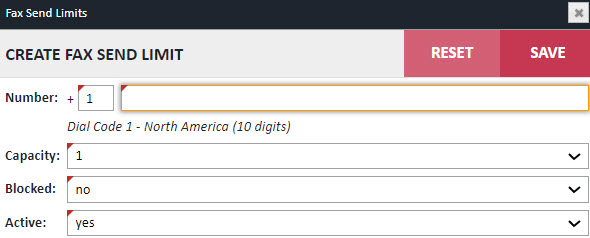
- Fill out the following fields
Field Description Number Enter the correct country code and number. Do not use dashes or spaces Capacity 1-4 - The number of allowable simultaneous faxes sent at one time Blocked Yes/No - This number blocked from sending faxes Active Yes/No - This send limit active - When you are done, click Save