General
Permissions
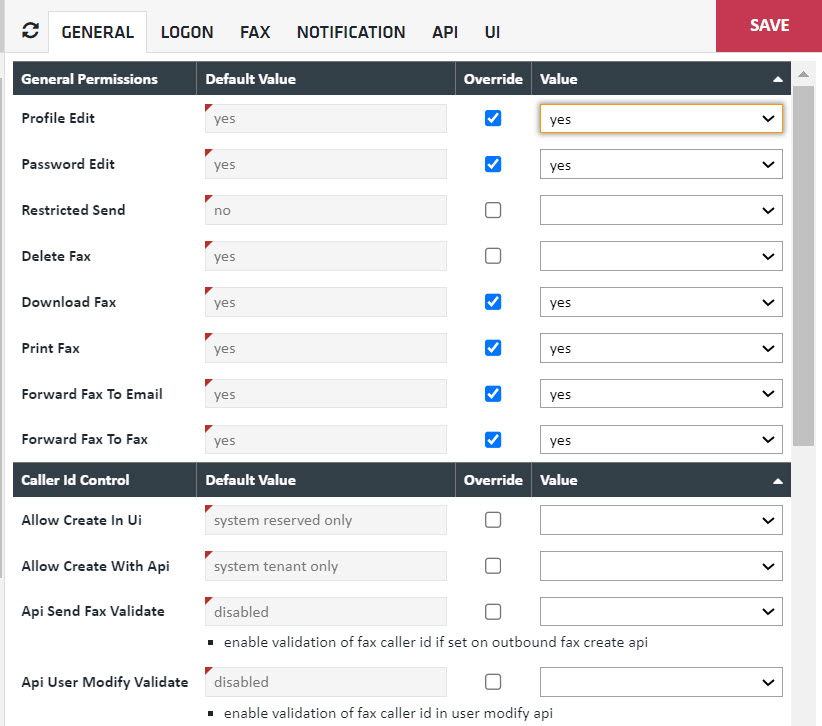
This section displays the list of permissions that can be assigned at both the tenant level and the individual user level within a tenant.
By default, permission values are inherited from the parent tenant.
Modifying Permissions
To change a permission setting:
- Select the Override checkbox for the permission you want to modify.
- Assign the desired value in the field to the right.
- Click Save to apply the changes.
Any overridden values will replace the inherited default settings for the selected tenant or user.
|
Field |
Value |
| General Permissions | These are user specific permission defaults. You can overide these when manaing individual users' permissions |
| Profile Edit | Yes/No - Can the user edit their profile |
| Password Edit | Yes/No - Can the user edit their password |
| Restricted Send | Yes/No - Can the user send a fax |
| Delete Fax | Yes/No - Can the user delete a fax |
| Download Fax | Yes/No - Can the user download a fax |
| Print Fax | Yes/No - Can the user print a fax |
| Forward Fax to Email | Yes/No - Can the user forward a fax to an email address |
| Forward Fax to Fax | Yes/No - Cam the user forward the fax to another fax number |
| Caller ID Control | Fax caller ID permissions for the UI and API. Applies to the tenant. |
| Allow Create in UI | Fax caller ID create and delete permissions in the UI (system only, admins in this tenant only, admins in this tenant and sub-tenants) |
| Allow Create with API | Fax caller ID create and delete permissions in the API (system tenant only, this tenant and sub-tenants) |
| API Send Fax Validate | Enable validation of fax caller ID if set on outbound fax create API (disabled/enabled) |
| API User Modify Validate | Enable validation of fax caller ID in user modify API (disabled/enabled) |
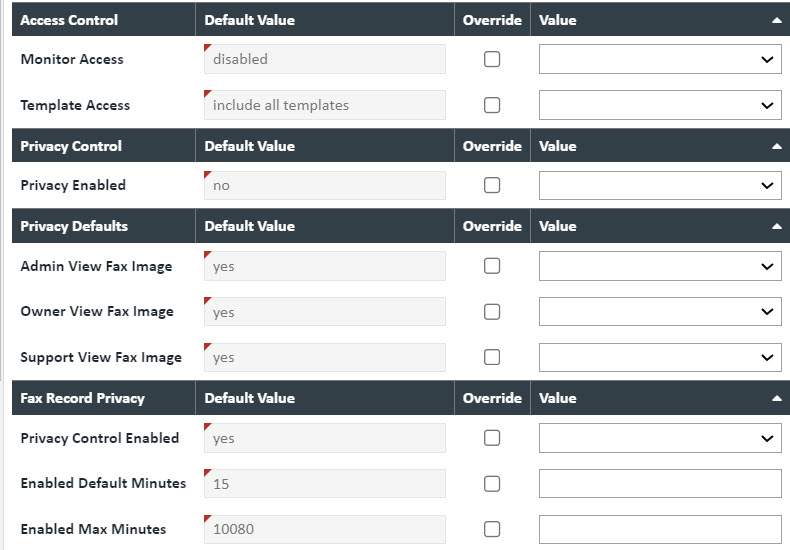
The section below contains privacy and access control defaults
|
Field |
Value |
| Access Control | Access control default for the |
| Monitor Access | disabled/enabled - non-system access to the monitor for the tenant |
| Template Access | Access to message templates (exclude system templates/include all templates) |
| Privacy Control | Privacy control defaults on the user's settings>profile |
| Privacy Enabled | Yes/No - Privacy control enabled. If yes, allows the user for the user to determine fax viewing privacy for the owner/admin/support located on the user's Settings>Profile>Privacy Control |
| Privacy Defaults | Specific privacy control defults for this privacy control section |
| Admin View Fax Image | Yes/No - Can the Admin view the fax image |
| Owner View Fax Image | Yes/No - Can the fax owner view the fax image |
| Suport View Fax Image | Yes/No - Can support view the fax image |
| Fax Record Privacy | Default time settigns for how long owner/admin/support can view faxes |
| Privacy Control Enabled | Yes/No - Can the user control how long faxes are viewed for |
| Enabled Default Minutes | Default number of minutes faxes will be viewable |
| Enabled Max Minutes | Maximum number of minutes faxes are available |