System Settings
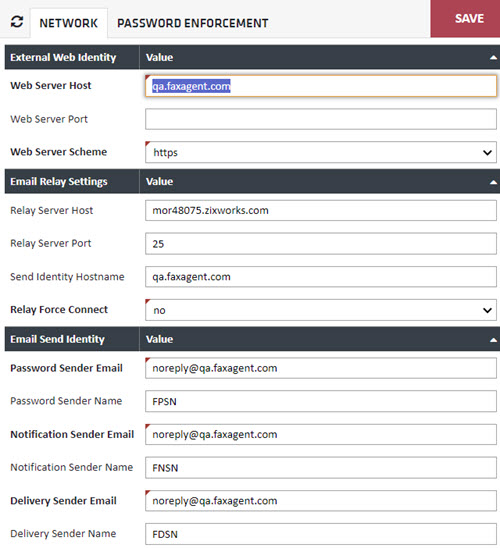
These fields contain the information on your company's external web, email relay settings, email notifiction information, as well as password enforcement They also function as Default values come for all sub-tenants. Fields in bold are required.
For your sub-tenants, these settings can be found on the Admin tab at, Admin>Company Settings>Identity.
|
Field |
Value |
| External Web Identity | |
| Web Server Host | Your domain, that when navigated to, will redirect to your FaxAgent instance |
| Web Server Port | The port for your web server host |
| Web Server Scheme | Http or https |
| Email Relay Settings | You must establish an MX record on your mail server to accept email routing to/from FaxAgent |
| Relay Server Host | The email server IP Address all FaxAgent emails are routed through |
| Relay Server Port | The port your email server uses |
| Send Identity Host Name | The name of your email server |
| Relay Force Connect | Attempt to connect directly to the destination sever if the MX record is not available |
| Email Send Identity | |
| Password Sender Email | For any passwords sent via email, the "From" email field |
| Password Sender Name | For any passwords sent, the "Name" email field information |
| Notification Sender Email | For any notifications sent, the "From" email field information |
| Notification Sender Name | For any notifications sent, the "Name" email field information |
| Delivery Sender Email | For any message delivery emails, the "Email" email field information |
| Delivery Sender Name | For any message delivery emails, the "Name" email field information |
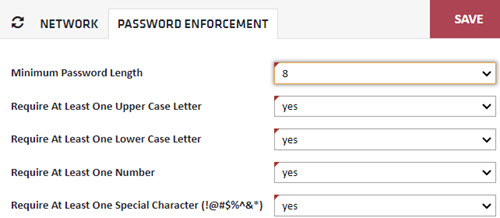
You can also set password enforcement for all of your tenants. Use the fields below to determine how you want to enforce passwords. These settings will apply to all tenants.