Accords
Accords
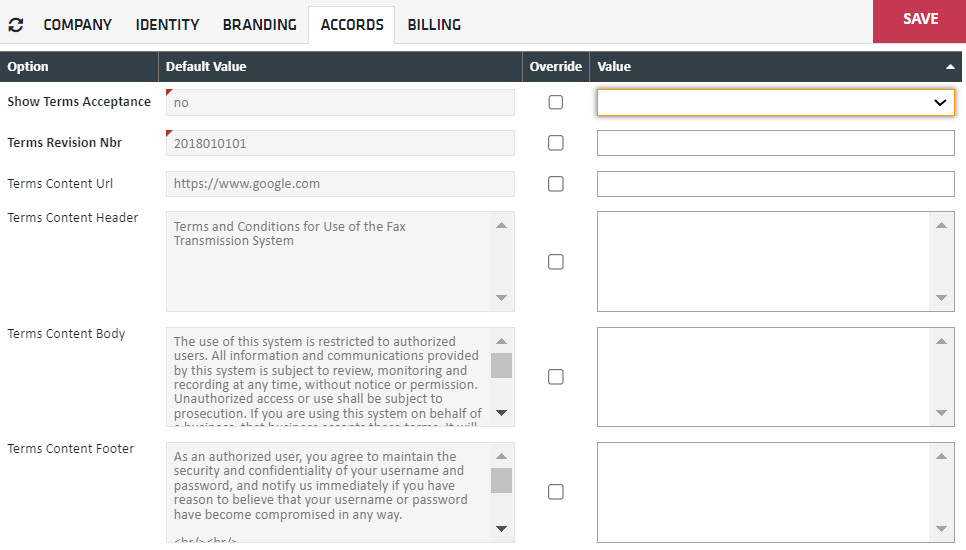
The Accords section provides additional security and liability protection during the login process.
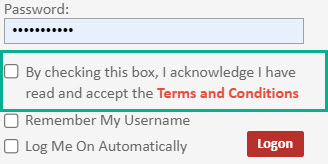
When the Terms and Conditions option is enabled on the login screen:
- Users must select a checkbox confirming they understand and agree to the terms before they can log in
- Users can click the Terms and Conditions link (displayed in red) to view the full text
The Terms and Conditions text entered in this section will replace the default text displayed on the login screen.
Be sure to review the content carefully before saving, as this text is presented directly to all users during login.
To display your organization’s specific Terms and Conditions, set the Override value for Show Terms Acceptance to Yes.
Once enabled:
- Update the Content Header, Body, and Footer fields with your customized terms
- Review the text carefully to ensure accuracy and completeness
- Click SAVE to apply your changes
The updated Terms and Conditions will be displayed on the login screen and must be accepted by users before they can log in.