Manage Tenants
Manage Tenants Grid
The Manage Tenants section allows you to create and manage your tenants and sub-tenants. Below is the grid containg the basic information for your tenant and any sub-tenants.

Tenant Actions
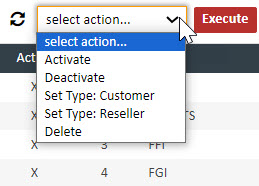
To perform any action on tenants:
- Highlight the tenant
- From the dropdown, choose your action
- Activate a tenant
- Deactivate a tenant
- Set Type: Customer - Set the tenant type to "Customer"
- Set Type: Reseller - Set the tenant type to "Reseller"
- Delete a tenant
- Click EXECUTE
Creating a Tenant
To create a tenant click the CREATE button. The following dialog will appear:

Complete your tenant settings, then click SAVE. Fields in BOLD are required.
| Field Name | Description |
| General Information | |
| Tenant Name | The name for your tenant |
| Tenant Code | Your tenant code. This must be at least 3 chracters with no spaces. |
| Company Name | The name of the company owing the tenant |
| User Suffix | Usually the same as tenant code but can be different. This serves as part of the username for any new users so they know what tenant they are logging in to. |
| Parent Tenant | The parent tenant to the one being created |
| Tenant Type | Either "Reseller" - which can create new sub-tenants for their customers, or "Customer" - the end user |
| Description | Any added description for this tenant |
| Billing Code | Billing code - if any |
| Fax Settings | |
| Cover Page | Choose the default cover page for this tenant from the drop down |
| Country Code | The default country code for this tenant. |
| Area Code | The main area code for this tenant |
| Local CSID | Your CSID (Called Subscriber ID). See FaxAgent Customer Support if you don't know this information. |
| Local Caller ID | The local caller ID assigned to this tenant |
| Administrative User | |
| User Name @ | The Admin user name is always defaulted to admin@usersuffix |
| Password | Click the show button to see the default password assigned. You can change this password after you save your tenant settings. |
| Privilege | Defaulted to admin for the admin user |
| Display Name | The name for this user displayes in the application |
| The email address for this user | |
| Phone | The phone number for this user |
| Additional Company Information | |
| Phone | Company phone number |
| Fax | Company fax number |
| Company email address | |
| Address 1 | Street Address Line 1 |
| Address 2 | Street Address Line 1 |
| City | Company City |
| State | Company State |
| Area Code | Area code for your company |
| Country | Country for the tenant |