More Fax Details
More Fax Details
- Click the More Details icon from the Actions menu
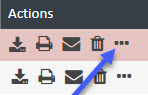
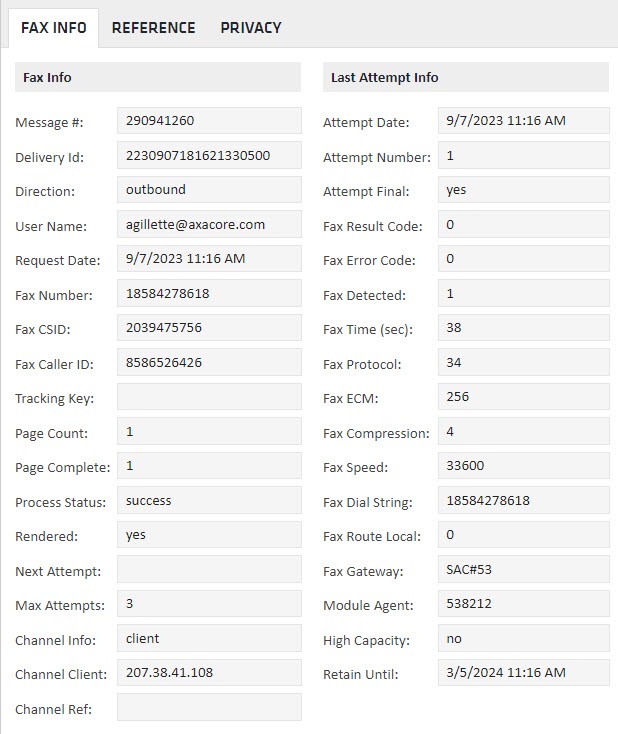
- The first is the FAX INFO tab. There are three tabs. When in Search Fax, there are two tabs. The privacy tab does not exist in the Serach Fax.
- The next Tab is the REFERENCE tab, which shows various fax codes
0/0000 - success
1000 = fax pending
4000 = failed
5000 = fax resource issue
5100 = fax request blocked
5200 = fax rendering issue
6000 = fax connect failed
6100 = fax number busy
6200 = fax machine not answering
6300 = fax detection failed
6400 = fax pickup failed
6500 = fax detection failed
6600 = fax detection timeout
6700 = fax remote call blocked
6800 = fax negotiation failed
7000 = fax training failed
8000 = fax transmit failed
9000 = fax failed
9999 = fax failed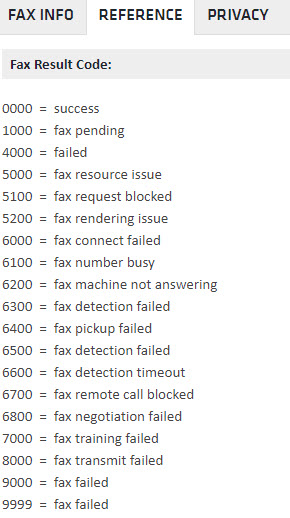
- The final tab is the PRIVACY tab. This tab details any privacy and view control on a fax.
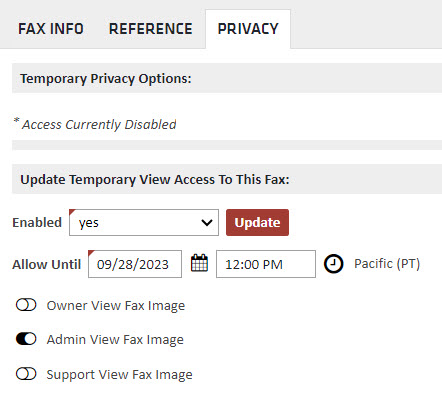
For temporary view access, under the "Update Temporary View Access To This Fax" field:
- Set Enabled to "yes"
- Set the date and time fields to your desired options
- Click the options for Owner View, Admin View, and Support View you want to have access to this fax for this time
- Set Enabled to "yes"